Unfortunately, this deal is no longer available
*
1184°
Posted 25 August 2012
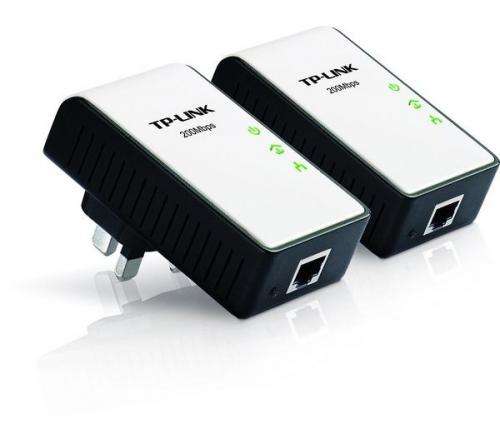
TP-LINK TL-PA211KIT 200Mbps Powerline kit - £24.44 @ Currys with code PLINE5

Shared by
deleted268614
Joined in 2010
171
122
About this deal
This deal is expired. Here are some options that might interest you:
Lowest price ever?
Use code PLINE5 at the last stage of the checkout to get this price.
The TP-LINK TL-PA211 AV200 Mini Powerline Ethernet Adapter transfers data through the electrical wires in your home. Due to this, no additional wiring is required and you are instantly able to benefit from the device just by plugging it in!
Enjoy high-speed transfer rates of up to 200Mbps allowing you smoother streaming of HD content, online gaming and an abundance of other bandwidth-intensive activities. Enhanced by HomePlug AV technology, this impressive transfer rate is stable for up to 300 meters, so you can even utilise it in the garden during those hot summer days!
Safety features include built-in Qos and powerful AES encryption for secure and stable connectivity. A pair button allows users to set up a Powerline-network with 128-bit AES encryption for data protection and network security.
With an ultra-compact design that perfectly compliments power outlets around the home, the TP-LINK TL-PA211 AV200 Mini Powerline Ethernet Adapter is great solution for your networking needs.
Technical Specifications
Speed
200 Mbps
Ethernet ports
1
Security features
128bit AES encryption
Characteristics
System requirements
Windows 2000, XP, 2003, Vista
Windows 7, Mac, Linux*
Other features
Easy Plug and Play operation
No configuration required;encryption established simply by pressing the Pair button on the adapter
1.8~30mHz Frequency range,
Accessories included
Ethernet cable (RJ45) x 2,Resource CD,
Quick Installation Guide
Dimensions
30 mm x 93mm x 56 mm (L x W x D)
Weight
0.352 kg
Use code PLINE5 at the last stage of the checkout to get this price.
The TP-LINK TL-PA211 AV200 Mini Powerline Ethernet Adapter transfers data through the electrical wires in your home. Due to this, no additional wiring is required and you are instantly able to benefit from the device just by plugging it in!
Enjoy high-speed transfer rates of up to 200Mbps allowing you smoother streaming of HD content, online gaming and an abundance of other bandwidth-intensive activities. Enhanced by HomePlug AV technology, this impressive transfer rate is stable for up to 300 meters, so you can even utilise it in the garden during those hot summer days!
Safety features include built-in Qos and powerful AES encryption for secure and stable connectivity. A pair button allows users to set up a Powerline-network with 128-bit AES encryption for data protection and network security.
With an ultra-compact design that perfectly compliments power outlets around the home, the TP-LINK TL-PA211 AV200 Mini Powerline Ethernet Adapter is great solution for your networking needs.
Technical Specifications
Speed
200 Mbps
Ethernet ports
1
Security features
128bit AES encryption
Characteristics
System requirements
Windows 2000, XP, 2003, Vista
Windows 7, Mac, Linux*
Other features
Easy Plug and Play operation
No configuration required;encryption established simply by pressing the Pair button on the adapter
1.8~30mHz Frequency range,
Accessories included
Ethernet cable (RJ45) x 2,Resource CD,
Quick Installation Guide
Dimensions
30 mm x 93mm x 56 mm (L x W x D)
Weight
0.352 kg
 More details at
 Community Updates

179 Comments
sorted byIf you purchased this you'll receive two Powerline Adapters in the box (we'll call them PA's from this point forward), and two ethernet cables. You take one PA and plug in the enclosed ethernet cable into the bottom of the PA. You then plug that ethernet cable into your router and then plug the PA into an electrical mains socket on the wall near to your router.
Next you take the 2nd PA to another room where you have a device you wish to access the internet with (ie TV, Playstation, XBox, Other PC etc etc). Again, plug in the enclosed ethernet cable into the bottom of the PA and then plug the other end of the ethernet cable into the device you wish to access the internet. Then plug the PA into an electrical socket near to the device.
Now you sync the two PAs. It tells you how to do this in the instructions in the box but it requires no technical knowledge, they basically just plug in, switch on and recognise each other on the network you've created (you created a network by carrying out the above procedures).
Once they're synced with each other you will be able to access the internet on the 'other' device. It really is that simple.
Hope that helps.
(edited)
are you serious?? oO
No it isnt. That's the maximum signalling rate. These only have a 10/100 Mbps Ethernet port for starters, and in use the maximum transfer rate with these over any appreciable distance is about 40mbits.
These are dated now - pay a bit more and get the 500 mbits ones - which will reliably stream 1080p material whereas these wont...Especially if you want to get the full benefit of fast broadband like Virgin 120MBits, or BT 80Mbits, etc.
(edited)
No. Your internet speed will remain the same at the main router but it could improve the speed you are getting at the 'other' device you're using to access the internet if you're accessing via wifi.
You do know It's coming up as:
Yeah it is a strange one. It's annoying having to buy a switch just so you can use more than one device with these plugs.
(edited)
No, you'd need a switch. e.g. amazon.co.uk/TP-…SPY
you may want to pay more and get a gigabit switch so you've got more flexibility to re-purpose it in the future, but it's faster than the powerline ethernet adaptors as is.
The * is to indicate a footnote that's been lost somewhere in the process of putting the specifications up. If you look at the TP-Link specs page, it simply says Linux. Furthermore Ethernet is Ethernet, there's no way of producing an ethernet that will work with one kind of OS and not another.
I think it has already been asked, and the answer is yes, you can use them both as 3rd and 4th adapters.
Voted hot and purchased 2, although out of stock, but delivery expected within 3 to 5 days(and discount code still working)
(edited)
Thank you
PS don't enter wrong house number like I've done so have to chase house over road. PC World not helpful at giving tracking number for Yodel.
Thanks, So will this boost the internet speed?
It will put an end to 'wifi' drop outs if that is the problem you are having. As for speed, the transfer rate is up to 200Mbps.
If you buy two lots do you have to use two ethernet ports on your router?
No. You can pair the 2nd set to go with the first so you can have one plugged in to the router and three others around the house.
Thank you!
EDIT: I see xenny answered that.
(edited)
Cheers
(edited)
Thank you very much , that was very clear
Thanks, I appreciate that very much
Thank you again, thanx
Router my room > No signal downstairs (Rubbish) > Use a plug like this but for wifi?
Thank you.
edit: mulletduck, i dont think so, i think these are wired only? I need kind of the same thing as you do but for my house only.
(edited)
These Devolo 85Mbps are £15.79 hotukdeals.com/dea…590
The above TP-Link 200Mbps are £24.44
Or Zyxel 500Mbps are £35.76 here hotukdeals.com/dea…820
It just depends how fast you want your connection to be. I'd pay an extra tenner for twice the speed with the Zyxels.
Yeh, I prefer to collect stuff as Currys is close.