Unfortunately, this deal is no longer available
*
2351°
Posted 24 December 2012
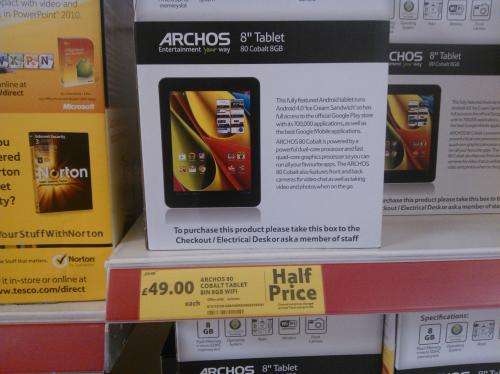
Archos 80 Cobalt Tablet (8”, 8GB, Wifi) - Tesco Instore and online - £49 Half Price
Shared by
ray.w
Joined in 2010
2
4
About this deal
This deal is expired. Here are some options that might interest you:
Cheap and cheerful 8inch Android tablet running ICS and micro Sdhc slot. Spotted at local Tesco this morning plenty of stock. - May not be able to buy until Boxing Day though!
NATIONWIDE DEAL.
DISPLAY
• 8” capacitive multitouch screen 16 million colors
• 1024 x 768 pixels (HD)
STORAGE
• Flash memory: 8 GB*
• Expandable via micro SDHC Slot up to 64 GB
• ANDROID™ 4.0 “Ice Cream Sandwich”
• Dual core @ 1.6 GHz with Quad core GPU
• 1GB RAM
• Built-in speaker
• Microphone
• G-sensor
• Front camera 0.3 MP
• Back Camera 2MP
• HDMI
• 153.5 x 203 x 11.5 mm – 470g
THE TABLET IS ONLY 1-2MONTHS OLD AND WAS INTENDED TO BE A COMPETITOR FOR THE APLLE IPAD MINI. SPEC IS VERY SIMILAR AND BETTER IN SOMETHINGS E.G. 1GB RAM (2X MORE THAN IPAD MINI)
archos.com/pro…ena
- wazbani
Micro HDMI*
- wazbani
PLEASE NOTE **** THIS HAS NO HDMI ***
- whhaatt2005
ebay.co.uk/itm…064
THIS s a 'micro HDMI'.
as specified in the manual.
So has 'Micro/Mini HDMI' not regular HDMI (TYPE A)
- wazbani
See post #560. No HDMI, micro or otherwise.
- Jumpingphil
Apps you may need -
'Screen Adjuster' from Play store - (screen color and a contrast adjustment) - thanks to GAVINLEWISHUKD
'Dead Pixel Detect and Fix' from Play store
- kaku_lala
- kaku_lala
UPDATE!!! This is now available online!!!!
- marjy5
TDX-KJPW for £10 off £50 spend New Customers
- jony7
should also be 3.03% topcashback -
- Captainbeavus
should also be 3.03% topcashback -
- Captainbeavus
26th Decemember-9:45am- Sorry, this product is currently unavailable.
- chapchap
Not expired. Still loads in Tesco Ilkeston. They can be found at checkout on 1st floor .
At least 20 left 30 min. ago . (i bought mine at 2.05 pm)
- klopikxda
2 year manufactures warranty
- caverncity
**********************************************************************************
HOW TO ROOT THE ARCHOS :
forum.xda-developers.com/sho…906
**********************************************************************************
- Mecoconuts
NOW BACK TO FULL PRICE £99.
- commissio
DISCUSSION THREAD: hotukdeals.com/tag…654
Let this one die down now instead of bumping needlessly, thanks to OP however for the post
- Nailez
NATIONWIDE DEAL.
DISPLAY
• 8” capacitive multitouch screen 16 million colors
• 1024 x 768 pixels (HD)
STORAGE
• Flash memory: 8 GB*
• Expandable via micro SDHC Slot up to 64 GB
• ANDROID™ 4.0 “Ice Cream Sandwich”
• Dual core @ 1.6 GHz with Quad core GPU
• 1GB RAM
• Built-in speaker
• Microphone
• G-sensor
• Front camera 0.3 MP
• Back Camera 2MP
• HDMI
• 153.5 x 203 x 11.5 mm – 470g
THE TABLET IS ONLY 1-2MONTHS OLD AND WAS INTENDED TO BE A COMPETITOR FOR THE APLLE IPAD MINI. SPEC IS VERY SIMILAR AND BETTER IN SOMETHINGS E.G. 1GB RAM (2X MORE THAN IPAD MINI)
archos.com/pro…ena
- wazbani
Micro HDMI*
- wazbani
PLEASE NOTE **** THIS HAS NO HDMI ***
- whhaatt2005
ebay.co.uk/itm…064
THIS s a 'micro HDMI'.
as specified in the manual.
So has 'Micro/Mini HDMI' not regular HDMI (TYPE A)
- wazbani
See post #560. No HDMI, micro or otherwise.
- Jumpingphil
Apps you may need -
'Screen Adjuster' from Play store - (screen color and a contrast adjustment) - thanks to GAVINLEWISHUKD
'Dead Pixel Detect and Fix' from Play store
- kaku_lala
timtom786
also check how to install whatsapp and viber apps on android tabs without 3G/4G...
Viber - hotukdeals.com/fre…348
Whatsapp - hotukdeals.com/fre…563
Cheers!!!
Viber - hotukdeals.com/fre…348
Whatsapp - hotukdeals.com/fre…563
Cheers!!!
- kaku_lala
UPDATE!!! This is now available online!!!!
- marjy5
TDX-KJPW for £10 off £50 spend New Customers
- jony7
should also be 3.03% topcashback -
- Captainbeavus
should also be 3.03% topcashback -
- Captainbeavus
26th Decemember-9:45am- Sorry, this product is currently unavailable.
- chapchap
Not expired. Still loads in Tesco Ilkeston. They can be found at checkout on 1st floor .
At least 20 left 30 min. ago . (i bought mine at 2.05 pm)
- klopikxda
2 year manufactures warranty
- caverncity
**********************************************************************************
HOW TO ROOT THE ARCHOS :
forum.xda-developers.com/sho…906
**********************************************************************************
- Mecoconuts
NOW BACK TO FULL PRICE £99.
- commissio
DISCUSSION THREAD: hotukdeals.com/tag…654
Let this one die down now instead of bumping needlessly, thanks to OP however for the post
- Nailez
 More details at
 Community Updates







3161 Comments
sorted byHow to uninstall apps:
Go to settings > Apps > select the unwanted app > uninstall
If you're using Go Launcher HD, you may go to the app drawer > touch and hold unwanted app until it shakes > tap x on the app icon
How to get Flash (no rooting required):
Download and install this file and use a browser like Dolphin to see flash content from websites. This will allow you to watch videos on websites.
How to find missing apps (no rooting required):
If you can't find apps you need from the Play store, you may Google the app name followed by APK to find the installation file. Make sure you allow side loading of apps by going to Settings > Security > Unknown sources > allow installation on non-market apps. You can also use another App store like Blackmart. WARNING: Install anti-malware apps like Avast to protect your tablet from viruses/malware specially if you download apps from unknown sources.
How to make the screen better (no rooting required):
Download and install Screen adjuster app from the Play store. Open and adjust Green (+5) and Blue (+5). Don't forget to tap the top button to 'Adjuster ON'. You may also lower the brightness further by adjusting the brightness bar. WARNING: Turn the Adjuster off when installing apps and turn on again afterwards.
How to make the sound louder/better (no rooting required):
Install apps like Speaker boost or Volume+ from the market or search the APK from Google. For Volume+, tap Speaker settings > simple volume boost > select level of loudness.You may also adjust bass and echo or use custom EQ settings.Don't forget to enable audio modifications by ticking the box on the right to apply. To test, play music in the background and enable/disable audio modifications. You may need to choose high settings of adjustment to hear the difference. NOTE: If you use earphones, use speaker settings not headset settings for adjustment.
For videos, MX player app will enable to boost volume up to 200%
How to stop icons/widgets getting stuck (no rooting required):
Use a different launcher like Go Launcher HD or Apex launcher and set it as default launcher. They have better interface and more settings.
How to stop the wifi turning off (no rooting required):
Check wifi signal strength of your router disconnections may be cause by poor wifi signal. Go to Settings > wifi > tap 3 dots on upper right corner > advanced > Keep wifi on during sleep > Always
How to install a screen protector:
I ordered mine from eBay, just search for Kindle Fire HD 8.9 screen protector. For installation procedures, read owner's thread.
How to take a screnshot (no rooting required):
Press and hold power button then press volume down button
How to transfer music/photos/videos/etc to the tablet:
Go to Settings > storage > tap 3 dots on upper right corner > USB connection > tick Mass storage. This will make your tablet act as an external hard drive when you connect it to your PC via USB cable. After connecting the tablet to the PC, tap lower left corner of tablet > tap USB connected > turn on USB storage > OK.The tablet will appear as removable drive in the PC and you can transfer files as you would with a regular flash drive. When you're done, tap turn off USB storage on tablet's screen and unplug the cable.
You may also use Airdroid for small files to transfer wirelessly. Just open the app and open web.airdroid.com/ in your PC's browser. Enter the code or use the tablet's camera to scan the QR code on the PC screen to connect automatically.
How to root the tablet:
Here's a link for the instructions. Most people specially those new to Android do not need this feature as it involves a bit of reading and danger of damaging the tablet. Try at your own risk.
Recommended apps:
* Screen Adjuster - add green/blue +5 and it fixes the colours, you can also lower brightness even further for night reading (free)
* TV Catchup - watch live TV via wifi (free)
* TV Guide UK - its a tv guide app for UK (derp - free)
* Go Launcher HD - change the UI with lots of personalisations available (free)
* HD widgets - widgets for weather, time/date, etc.
* Camera Zoom Fx - more camera settings plus photo editor but still crap lens
* Airdroid - transferring files wirelessly via wifi
* Quickpic - better gallery app (free)
* Volume+ - fix low volume/base/echo
* Bling Bling LED - use your tablet as a sign (free)
* MX Player - play almost any video format with lots of options (free)
* Distro - free technology magazine
* Kingsoft Office - open/edit/create word, excel, powerpoint. pdf files (free)
* Printer Share - directly print photos and office files via wifi
* ES File explorer - more options than the regular explorer and can open ZIP and RAR files
* Blackmart - get missing apps not available from Play store
* Tune in Radio - listen to loads of radio channels via wifi
* News - BBC news app (free), Flip (free)
* Games - Muffin Knight, World of Goo, Beat Hazard Ultra, Jetpack Joyride
* Others - Sonos controller app, TV remote app, Reddit is fun, IGag
Also for those asking:
* NO HDMI port
* NO bluetooth
* NO GPS
* NO Simcard slot
*
I compared it with my Nexus 7 and my Samsung Galaxy Tab 2.
[img]i.imgur.com/Au2…jpg?1[/img]
[img]i.imgur.com/fXS…jpg?1[/img]
[img]i.imgur.com/sFY…jpg?1[/img]
[img]i.imgur.com/sru…jpg?1[/img]
[img]i.imgur.com/95s…jpg?1[/img]
(edited)
(edited)
I recommend the following apps:
* Screen Adjuster - add green/blue +5 and it fixes the colours, you can also lower brightness even further for night reading (free)
* TV Catchup - watch live TV via wifi (free)
* TV Guide UK - its a tv guide app for UK (derp - free)
* Go Launcher HD - change the UI with lots of personalisations available (free)
* HD widgets - widgets for weather, time/date, etc.
* Camera Zoom Fx - more camera settings but still crap lens
* Airdroid - transferring files wirelessly via wifi
* Quickpic - better gallery app (free)
* Volume+ - fix low volume/base/echo
* Bling Bling LED - use your tablet as a sign (free)
* MX Player - play almost any video format with lots of options (free)
* Distro - free technology magazine
* Kingsoft Office - open/edit/create word, excel, powerpoint. pdf files (free)
* News - BBC news app (free), Flip (free)
* Games - Muffin Knight, World of Goo, Beat Hazard Ultra, Jetpack Joyride
* Others - Sonos controller app, TV remote app, Reddit is fun, IGag
Please like so it will be on top and people will see it. Thanks
(edited)
Haven't you learnt anything about tescos yet.
I smiled and tried to get away but he kept talking about it and then said we should go back to his and try the tablets together, download apps etc. I said I had a hospital appointment later (Boxing day I know but it's all I could think of) but he kept saying it wouldn't take long.
I didn't know what to do so I just said I'll meet you by the cash machines, gave it a minute, then left the store and ran as fast as I could in the opposite direction.
I nearly got abducted for this tab so my wife better like it.
No chance. Not after you have a history of trying to profit on the for sale forum:
hotukdeals.com/for…109 (edited)
Oh dear god, just read the title or look at some of the other posts for christ sake.
Shameful..
1. Trace around the tablet on the screen protector.
[img]i.imgur.com/WFe…g?1?4481[/img]
2. Cut out the shape of the tablet. Allow for the edges by taking off a few millimetres.
[img]i.imgur.com/JKX…jpg?1[/img]
3. Make sure the screen is clean. You may use spec cleaner to avoid streaks and dust.
[img]i.imgur.com/GX1…jpg?1[/img]
4. Install the screen protector. Start from one edge and push out bubbles.
[img]i.imgur.com/Hl4…jpg?1[/img]
5. After peeling the outer layer, spray some spec cleaner to make the new surface is smooth and finger-print resistant.
[img]i.imgur.com/0Nt…jpg?1[/img]
Looks great! I prefer NON-matte screen protector because they are smoother and does not lessen screen viewing angles/brightness.
Responsiveness of touch screen is unchanged. Please like if you find this helpful so other members will see it on the first page
In that respect probably just as strong as any other tablet screen - not designed to take jumping kids! oO
youtube.com/wat….be
Red apple: Had a look... looks okay to me. No discolouration/distortion 'til I tilt the screen, though it does distort (become pixellated) very quickly. Was worried because the clouds in that Big Buck Bunny video looked pink and pixellated but the grass was green and sharp. Other videos are fine so I think it's more to do with the quality of the video. I did get that flickering on a very white screen but I cannot now replicate it. It might be something to do with it being daylight now though. Didn't notice flickering at any other time.
Case pressure/screen distortion: There is a sensitive spot at the opposite end to the camera, but it does require deliberate effort which produces 'fingerprints' on the screen. I don't get any lines and am not about to press any harder to see if I do. There is no screen distortion at all from normal holding pressure.
Books: Text on Play Books is sharp and crystal clear. Very good, I would say.
Videos: It is playing anything I throw at it and playing it well; downloaded VLC player which is just the player I normally use. Don't even have brightness maxed out.
Audio: As you would expect. Laptop standard; more than adequate for me. Will probably require headphones outside.
Internet: Is quick and responsive; no problems to report. Wifi signal is strong.
Viewing angle: Is a bit limited but this is my first tablet so have nothing to compare it with. Perfectly adequate though for my needs - internet, videos, ebooks. Actually, now as I doublecheck it, the viewing angle seems pretty good. Maybe again, daylight hiding the detail (or lack thereof). I can say that altering your viewing angle can cause pixellation, so maybe that's a part of what people are reporting?
Battery life: Been playing about now for 4 hours, off and on. Battery still @ 49%.
Definitely happy with mine. Only quibble would be lack of HDMI. Though, as posted earlier, it mounts just like a USB stick if your TV has a USB port.
Would be interested to hear what the HDMI 'fix' is? Soldering the board? USB-HDMI? Would love to know...?
(edited)
[img]i.imgur.com/nDt…jpg?1[/img]
[img]i.imgur.com/klI…jpg?1[/img]
[img]i.imgur.com/0ii…jpg?1[/img]
[img]i.imgur.com/QhL…jpg?1[/img]
[img]i.imgur.com/jFk…jpg?1[/img]
The screen appears to be pixelised not because of the resolution but because of the quality of the LCD panel used.
The viewing angles are fine but the colour rendering is a bit off. For £49, it's a steal. For £99 it's definitely not
Now I want one just because it's cheap and every one here is going mad for them, I like to feel 'part of it'.
The power of HUKD? :P
I think this only happens when the tablet goes to sleep? Wi-fi is set to turn off by default in sleep mode. When waking up, wi-fi switches off-on-off-on continuously.
To fix:
Go into Settings
Click on Wi-fi, top left
Hit three squares @ top right of screen
Click on Advanced
Click on Turn Wi-Fi on during sleep
Always
Should sort it out.
(edited)
He's lying. His first post said he was putting 10 on ebay then in the next post it changed to selling 7 to friends and family.
Don't feed the trolls.
(edited)
Many thanks again to the OP for posting.
(edited)
Why would you bring one? lol
I'm going to send in a letter thanking them.
Just to counter your complaints.
USB OTG works fine. Camera is crap (off colours, low resolution, VGA video, little settings) but I don't expect much.
Here are sample shots taken indoors at night. I'm sure on a bright sunny day it will take decent outdoor photos.
[img]i.imgur.com/5oi…jpg?1[/img]
[img]i.imgur.com/dvx…jpg?1[/img]
[img]i.imgur.com/CFr…jpg?1[/img]
I work full time nights you muppet, by 6am after a night shift I have already been awake for 15 hours, so how is that the same?
(edited)
The 2 young ladies were loading trolleys up , there husband cousins brother or whatever were upstairs waiting in the queue ( clever tactic ) . They gave me a right dirty look and smiled as they cleared the shelves of the tablets. wasnt smiling when they left empty handed and saw us paying for ours :-) . Pure greed , yes maybe first come first served but Tesco should have a MAX PER CUSTOMER POLICY on such items.
have fun like me and bid on them on ebay with new fake ids then dont buy X)
Can you not read?
Ripping off friends and family. What a nice chap you are.
But you just said you are putting 10 on ebay. Get your story straight.
There is no way the social would give you a crisis loan on boxing day to even buy these.
[img]i0.kym-cdn.com/pho…jpg?1321408042[/img]
Yes they can, you do not have a right to be on Private Property (i.e. a shop) if they asked you to leave (Don't have to give a reason) and the person refuses, they are then trespassing, and can be removed.
(edited)
Keep it open as technical support for the tablet.
We are all having similar probs.
Than to original poster.
I didn't win jack with the flamedeers , but this is some comfort for me.
Not a terrible person but somebody who i feel doesn't deserve the tablet when they have a history of trying to profit from items on limited promotion. Since you approve of such behaviour, i suggest you take yourself onto eBay and pay £70/£80 for one.
Opportunists grabbing armfuls at £50 a pop then attempting to sell at £70-£80, under the full retail price 0f £99, only to discover that they were actually on sale in store for £69.
That there is proper Karma.
They've either done that or reacted really fast to what has happened.
Whatever the case, it would be a shame if the rip off merchants have to sit on their investment for a bit then release them back at cost. That would be a proper lesson learnt.
People on here complaining that they didn't get one. Saw this deal on christmas eve and that some Tesco stores were selling this item early, so I phoned the wife who was in a Tesco Extra to ask if they had any. She was informed that the tablet would be on sale on boxing day only.
I was up early on boxing day and managed to order 1 from the web site, not knowing if this order would be fulfilled I headed off at nine am to the store and collected 1. People behind me were buying in multiples probably for friends or to sell on ebay (and why not). The people complaining seem to be bitter because they couldn't be bothered to do the legwork or get up early for this deal!
I wonder how many of these people don't mind stocking up on food deals or taking advantage of Tesco mis prices?
Or complain about having several accounts in their pets names to save a tenner online
Really don't know what people are carping on about. Maybe they need eye tests?!
It's not a 50" TV screen......it's an 8" tablet you hold 3 feet from yer face.
For £49.......
They have stock, it's on the shelf, you are in the store, the price is good and some jobsworth won't let you have it and can't see the stupidity in having the item unavailable to buy?
Your tolerance levels are far more forgiving than mine.
Or is there a huge banner saying from the 26th and I'm missing the point?
Shows £49 yet adds to basket at £99, grrrr
Now live GO GO GO!
(edited)
No.
It really isn't.