Unfortunately, this deal is no longer available
*
256°
Posted 30 September 2012
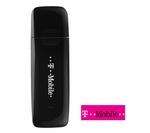
T-Mobile E120 Pay As You Go Mobile Broadband USB Modem (No contract) £4.99 @ Currys
Shared by
Skybird
Joined in 2008
51
1,649
About this deal
This deal is expired. Here are some options that might interest you:
Saw this contract free dongle on Currys website and thought it was a good deal considering its doesdn't require you to have any contract .I've got a T-mobile data simcard already so hoping this will be ok.
 More details at
 Community Updates




31 Comments
sorted byTMobile Deal here at Currys
and
askmefast.com/Set…tml
if you have any problems
Link doesn't go anywhere on the GSM forum anymore.
i might just go home delivery on the 9.99 one (above is all links to help people unlock the 9.99 dongle and use with tablets )
ZTE MF626 unlock Free
ZTE MF626 unlock Free
How to Unlock a ZTE MF626 3G Wireless Modem
Download Unlocked Firmware for it here:
web.portal.globe.com.ph/vis…exe
Remember to remove SIM card before running the updates.
If you are with Telstra & want the SIM balance & re-charge utility, go to
zte.com.au/mai…htm
to download the "Upgrade Tool"
zte.com.au/dow…zip
Remember to remove SIM card before running the updates.
It will be still be unlocked after running the update.
If you want generic connection software go to the 3 site.
three.cachefly.net/Sof…zip
installation of 3 mobile broadband connection manager for Australia which apparently works with UK settings (and other sims)
unplug modem
uninstall globe/telstra/or other connection software
reboot
install aussie 3 connection manager
plug modem in and let it detect the drivers (if any fail, point it at C:\Program Files\3 Mobile Broadband\drivers)
load dash and add your settings
I unlocked 2 ZTE MF626's using this procedure, I don't claim to be original author of this, also found how to unlock a ZTE MF627, still looking 'how to unlock a ZTE MF636'.
Other settings:
o2 Contract SIM:
Config Name = O2
Dial Number= *99#
user = faster
pass= password
APN= mobile.o2.co.uk
DNS servers= 193.113.200.195
DNS servers= 193.113.200.195
3 SIM:
Internet
APN: three.co.uk
IP address: Leave blank
Username: Leave Blank
Password: Leave blank
or try the following;
APN: 3internet
dial number is *99#
password: leave blank
username leave blank
BT Mobile SIM:
Internet
APN: btmobile.bt.com
IP address: 212.183.137.12
Username: bt
Password: bt
URL: wap.btmw.net
o2 SIM:
APN: mobile.o2.co.uk
Username: mobileweb
Password: password
Primary DNS: 192.113.200.200
Secondary DNS: 192.113.200.201
SMTP gateway (for email): smtp.o2.co.uk
Orange SIM:
APN: orangeinternet
Username: Leave blank
Password: Leave blank
Primary DNS: 193.035.131.194
SMTP gateway (for email): smtp.orange.co.uk
T-Mobile SIM:
APN: general.t-mobile.uk
Username: user
Password: pass
Primary DNS: Set automatically
SMTP gateway (for email): smtp.t-email.co.uk
Vodafone SIM:
APN: internet
Username: web
Password: web
Primary DNS: 158.043.240.004
SMTP gateway (for email): smtp.vodafone.net
forum.gsmhosting.com/vbb…tml
would you please point me in the right direction for unlocking the 627 as I was unable to find a free solution.
Link for web.portal.globe.com.ph/vis…exe not working
(edited)
Think you can use dccrap also.
(edited)
That is a E120 its made by Huawei but badged as T-mobile.